
Learning Center
Enrollment Codes for FEHB: The Complete Lookup Guide
You're completing an FEHB election, and the form has stopped you at a small field containing three digits. The plan name looks familiar, but you're not sure whether the code identifies the carrier, the option, your coverage tier, or all three. An HR specialist may face the same uncertainty while checking a new hire's SF-2809 against an electronic enrollment record.
That hesitation is reasonable. FEHB enrollment codes are the identifiers that connect a selected plan with an enrollment category, so a mistyped or mismatched code can create trouble for plan matching, premium deductions, and downstream HR processing. The system becomes easier to manage once you separate three questions: what the three digits identify, what the final digit does to coverage, and why a separate event code may appear on the same transaction.
This guide follows the path an employee or benefits specialist takes in practice. It explains how the code is constructed, how Self Only, Self Plus One, and Self and Family relate to the final digit, how carrier examples reveal the pattern, where the code belongs on enrollment paperwork, and how to verify or correct an error. For broader background on the program itself, see this guide to the Federal Employees Health Benefits program.
Why Enrollment Codes for FEHB Matter
An employee selects an FEHB plan during onboarding, writes the correct plan name on the form, and enters one incorrect digit. The error can look minor, yet the record may point to a different coverage category. A family member might not be attached as expected, or payroll could process deductions that do not match the employee's intended election.
OPM materials describe the code as a structured identifier in which the first two digits identify the plan, while the third digit identifies the option and enrollment type (OPM enrollment guidance). The code therefore works like a routing label. It gives the agency, payroll office, and carrier a shared value for recognizing the election instead of relying only on a plan name.
Practical rule: Treat the code, plan name, enrollment category, and effective date as one matched set. Verify all four before submitting the election.
The code affects more than the form
HR and payroll systems process structured fields. They do not depend on a benefits specialist to interpret free-text descriptions each time an enrollment moves between systems. The plan portion connects the election to the appropriate plan record, while the final digit identifies the selected option or enrollment type. OPM public-use-file and data-standard materials describe the data structure used to support consistent processing across systems (OPM public-use-file and data-standard materials).
That consistency matters during open season, a new-hire election, and a qualifying life event. A plan name may be shortened, displayed differently, or entered with local formatting. The code supplies a more precise value for matching and transmission, but it cannot replace checking whether the selected plan and coverage tier are correct.
For broader background on the program, consult this guide to the Federal Employees Health Benefits program.
The questions employees usually need answered
- What does each digit mean? The first pair identifies the plan. The final digit distinguishes the option or enrollment category.
- Is an event code the same thing? No. See the event-code section below for how the two codes differ.
- Where should I verify the value? Check the current OPM plan key, plan comparison record, or carrier brochure before submitting the election.
- What if the code and plan name disagree? Stop and ask the agency benefits office to resolve the mismatch. Guessing can send an otherwise valid election into correction work.
The code is a verification checkpoint, not a substitute for reviewing the complete election.
How the Three-Digit FEHB Code System Works
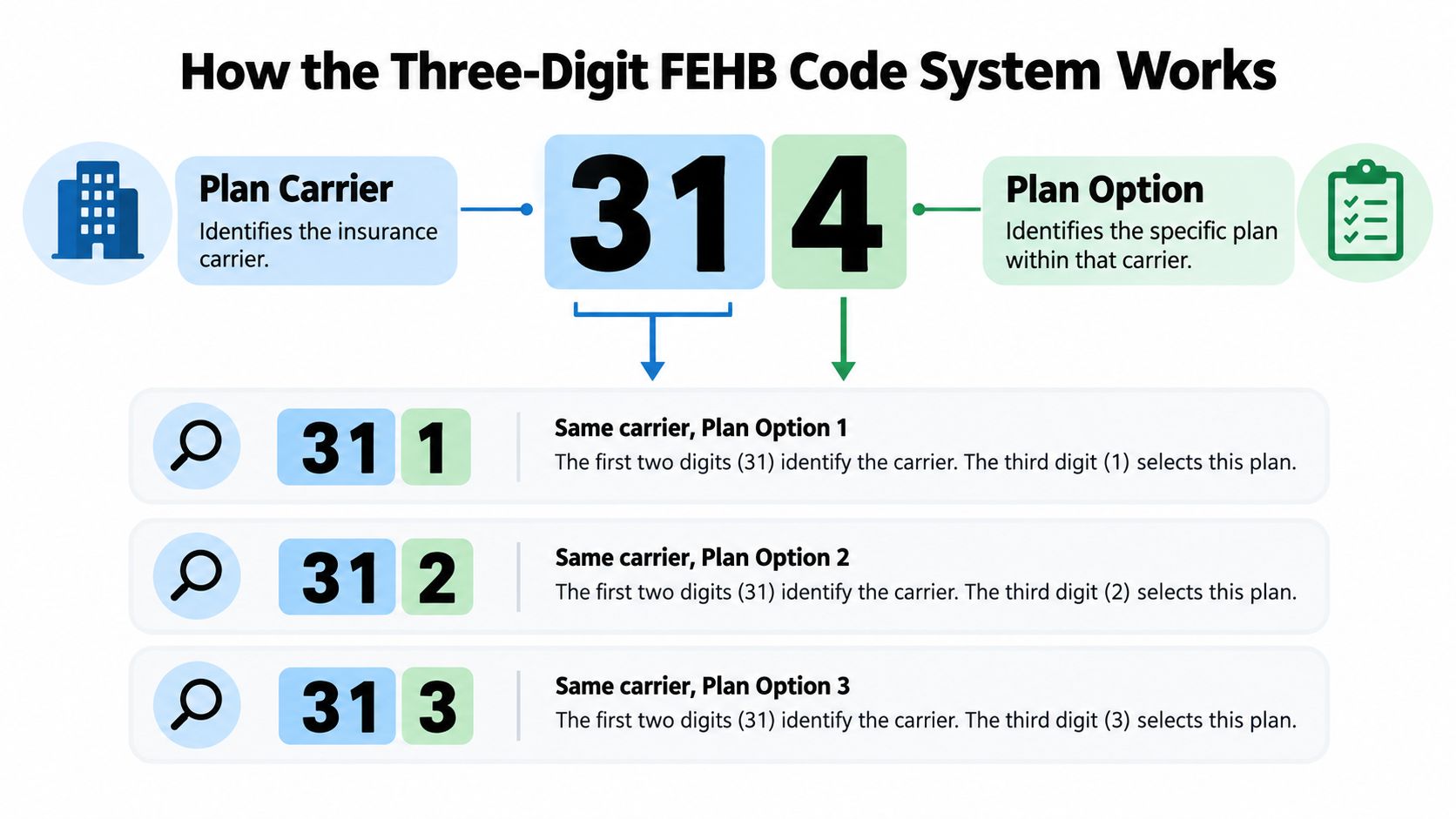
Read an FEHB enrollment code from left to right. It contains three digits, but those digits operate in two parts:
- The first two digits identify the health plan.
- The third digit identifies the option and enrollment type.
That structure is described in OPM enrollment materials and reflected in agency guidance. The first pair gives the system the plan identity, while the final digit supplies the selection within that plan structure.
Start with the first two digits
Take a code such as 314. The first two digits, 31, are the plan identifier. They direct the system to the relevant carrier or plan record. They aren't a personal employee number, and they aren't an event reference.
If the first two digits change, you're generally looking at a different plan identifier. That change can affect the plan record that HR, payroll, and the carrier use for matching. You shouldn't assume that a code with a similar appearance represents the same plan.
Then read the final digit
The last digit, 4 in the example above, identifies the applicable option and enrollment type within the plan coding structure. When the first two digits stay constant and the final digit changes, the plan family remains connected while the selected option or coverage category changes.
That is why FEHB materials often show codes in related groups. A sequence of three codes can represent the same plan option across Self Only, Self Plus One, and Self and Family, with the final digit distinguishing the tier.
Why standardization matters
These aren't random numbers invented independently by each carrier. The same national coding approach appears across OPM plan comparisons, carrier enrollment materials, and agency processing documentation. Standardization lets different administrative systems interpret the election consistently, even when the employee sees only a compact code on a form or confirmation screen.
Read the code in layers: first identify the plan with the opening pair, then confirm the option and enrollment category represented by the final digit.
Don't infer a code from memory, even if you've used the same carrier before. A familiar first pair doesn't prove that the final digit matches the coverage you want. Use the current plan key or brochure to confirm the complete value.
Enrollment Categories and Coverage Tiers
A code can change even when the employee stays with the same carrier. The reason may be the selected coverage tier, which identifies who receives benefits under the FEHB election. The three categories are Self Only, Self Plus One, and Self and Family. They describe enrollment scope, not just marital or household status.
| Enrollment category | Who it covers | Practical use |
|---|---|---|
| Self Only | The enrolled federal employee or retiree | Use when no eligible family member needs coverage under the election |
| Self Plus One | The enrollee and one designated eligible family member | Use when coverage is needed for the enrollee and one eligible family member |
| Self and Family | The enrollee and all eligible family members | Use when the election must cover the enrollee and the full eligible family group |
The two family categories serve different purposes. Self Plus One names one eligible family member, while Self and Family extends coverage to all eligible family members who meet program requirements. For a comparison of these categories, consult OPM's Self Plus One comparison information.
Choosing between the tiers
Start with the people who need coverage, then confirm that each person qualifies as an eligible family member. One eligible family member points to Self Plus One. More than one generally points to Self and Family.
A household with several relatives should not assume Self Plus One covers everyone. The category is limited to the enrollee and one designated eligible family member. Eligibility also matters independently of the tier selected. An employee cannot add someone solely because broader coverage is desired, and an agency or carrier may request documentation when an enrollment change occurs outside the regular open-season process.
The final digit follows the tier choice
The enrollment category usually appears in the final digit of the three-digit code. If an employee moves from Self Only to Self Plus One or Self and Family, the first two digits may remain associated with the same plan or option, while the complete identifier changes.
That pattern explains why an employee may see a new code after changing coverage scope without changing carriers. The plan relationship remains, but the enrollment category has changed. Treat the code as a complete value. Confirm it against the current plan materials instead of changing only the final digit by hand, because a familiar opening pair does not prove that the remaining digit matches the intended tier.
Detailed Code Examples From Major FEHB Carriers
Concrete triplets make the pattern easier to recognize. Blue Cross and Blue Shield FEHB materials list related groups such as 104, 105, and 106, 111, 112, and 113, and 131, 132, and 133. Other current OPM comparison materials show groups including 314, 315, 316 and 341, 342, 343 (GEHA enrollment materials).
The useful feature is the repeated structure. In each group, the opening digits identify the plan or option family, while the changing final digit distinguishes the coverage tier shown in the applicable plan materials.
| Code | Carrier or plan | Option | Coverage tier |
|---|---|---|---|
| 104 | Blue Cross and Blue Shield FEHB example | One listed option | Self Only |
| 105 | Blue Cross and Blue Shield FEHB example | Same option family | Self Plus One |
| 106 | Blue Cross and Blue Shield FEHB example | Same option family | Self and Family |
| 111 | Blue Cross and Blue Shield FEHB example | Another listed option | Self Only |
| 112 | Blue Cross and Blue Shield FEHB example | Same option family | Self Plus One |
| 113 | Blue Cross and Blue Shield FEHB example | Same option family | Self and Family |
| 131 | Blue Cross and Blue Shield FEHB example | A third listed option | Self Only |
| 132 | Blue Cross and Blue Shield FEHB example | Same option family | Self Plus One |
| 133 | Blue Cross and Blue Shield FEHB example | Same option family | Self and Family |
| 314 | OPM comparison example | Listed plan tier | Self Only |
| 315 | OPM comparison example | Same plan family | Self Plus One |
| 316 | OPM comparison example | Same plan family | Self and Family |
| 341 | OPM comparison example | Another plan tier | Self Only |
| 342 | OPM comparison example | Same plan family | Self Plus One |
| 343 | OPM comparison example | Same plan family | Self and Family |
Use the table as a pattern exercise, not as a substitute for the current brochure. A code's meaning depends on the plan record and the official enrollment materials attached to the applicable plan year. The carrier's document should confirm the exact option and tier before you enter the code.
Don't reverse-engineer blindly: A triplet pattern helps you spot relationships, but the current plan key remains the authority for a real election.
This distinction also prevents confusion with unrelated administrative markings. A three-digit plan enrollment code identifies coverage, while other symbols or transaction fields may serve reporting purposes. Federal Benefits Sherpa's explanation of FEHB special code ZZ addresses that separate issue.
Where to Enter Your Code on SF-2809 and HR Systems
On the SF-2809 Health Benefits Election Form, enter the three-digit enrollment code in the field designated for the plan's enrollment code. The code should accompany the matching plan name and the selected enrollment category. Don't place an event code in that field, and don't use a carrier abbreviation when the form asks for the numeric enrollment identifier.
A careful form review
Before submitting the form, compare the following fields:
- Plan name: Confirm that the written plan description matches the plan associated with the code.
- Enrollment code: Enter all three digits in their correct order, without transposition.
- Enrollment category: Check that Self Only, Self Plus One, or Self and Family matches the final digit shown in the current plan materials.
- Effective date: Confirm when the election or change should begin.
- Family information: If the category includes a family member, provide the required identifying and eligibility information.
The form is a connected record. A correct code paired with the wrong category still needs review. So does a correct plan name paired with a code from another option.
Electronic agency systems
New hires may make an initial election through an agency portal. Current employees may use an electronic open-season workflow, while HR specialists may enter or approve a change on the employee's behalf. The screen labels differ by agency, but the verification principle is the same: select the plan, confirm the enrollment tier, and check that the generated code matches the official materials.
If your agency uses digital workflows for multiple benefits forms, a resource on how to automate employee benefits forms may help HR teams organize document collection and signatures. Automation can reduce manual handling, but it doesn't replace checking the code against the current plan record.
Final review before transmission
Look at the confirmation page or saved form as if you were processing it for someone else. Does the code match the plan name? Does the tier match the family members listed? Does the effective date fit the event that triggered the change?
For a more detailed form walkthrough, consult this complete guide to the FEHB health benefits election form. If any field conflicts with another, contact your agency benefits specialist before submission.
Enrollment Event Codes and Qualifying Life Events
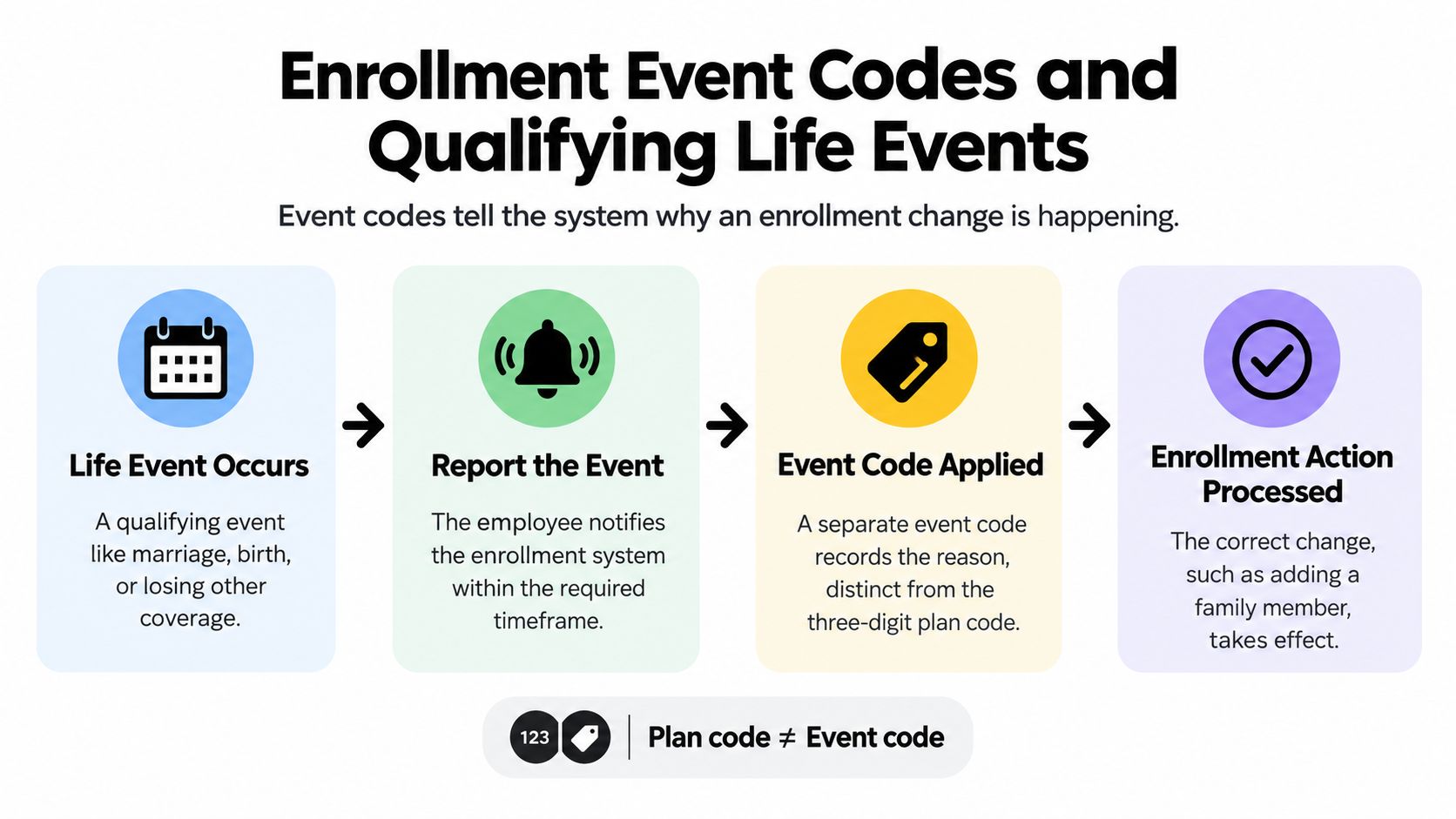
An employee gets married, adds an eligible family member, and updates an SF-2809. The three-digit plan code identifies the coverage election. The enrollment event code explains why the change is allowed. HR may need both values to process the request correctly.
Common event codes include 1A for the initial opportunity to enroll, 1C for family-status changes such as marriage or birth, and 1G for nonpay status changes. The OPM's enrollment event-code reference lists the applicable codes and related enrollment guidance. An event code does not replace the three-digit plan code. It records the administrative reason for the action.
How the two codes work together
For the marriage example, the submission may include:
- The three-digit plan enrollment code, which identifies the selected plan and coverage tier.
- The event code, which identifies the family-status change.
- Supporting documentation, where required.
- The effective-date information for the requested action.
These fields work like two labels on the same package. One directs the system to the chosen coverage record. The other explains why the employee may make the change outside the usual enrollment period.
Putting the event code in the plan-code field gives the system a reason but no coverage selection. Submitting only the plan code identifies the intended tier but may leave the mid-year change unsupported.
Life events require a matching action
A qualifying life event can permit an enrollment action, but the available action depends on the event and the employee's circumstances. Marriage or birth may support adding an eligible family member and changing from Self Only to a family category. A change in nonpay status may alter how the enrollment is administered without creating a new plan choice.
Ask the agency benefits office which action the event supports, what documentation is required, and which effective date applies. Do not assume that every qualifying life event permits every available change.
Plan code ≠ event code. Swapping them can cause an SF-2809 submission to be rejected because the system cannot match the selected coverage with the reason for the transaction.
Keep both values separate on the form and in electronic systems. That check catches a coding error before it delays processing.
Troubleshooting Common Enrollment Code Errors
A benefits specialist reviews an SF-2809 and sees a code that looks familiar, but the plan name shows a different option. That kind of mismatch can pass an initial visual check, so verify the digits, plan name, coverage tier, and effective date as one record. The symptom after processing often identifies which check was missed.

The common failure points
| Symptom | Likely cause | Fix |
|---|---|---|
| Enrollment is rejected | The code does not match the selected plan or is not valid for the transaction | Check the current OPM plan key or carrier brochure, then resubmit through the agency process |
| A family member is not covered | The final digit identifies a different coverage tier | Confirm the intended category and ask HR to correct the election with eligibility records |
| Payroll deductions do not match the election | The code and plan name identify different records, or the effective date conflicts with the transaction | Ask HR and payroll to compare the form, effective date, and transmitted code |
| The system displays an unfamiliar plan option | The first two digits or final digit were entered incorrectly | Compare each digit with current official plan materials, rather than relying on memory |
| A previously valid code no longer matches | The document belongs to an older plan year or uses an outdated option reference | Check the current plan comparison or carrier brochure before changing the enrollment |
Check the digits in the right order
Begin with the first two digits, which identify the plan record. Check the final digit next, matching it to the selected enrollment category. Then compare the full code with the plan name and option shown on the current document.
A transposed digit can still produce a plausible three-digit value. The system may accept it while attaching a different plan or tier. Treat the code like an address: one wrong character can send the transaction to the wrong record, even when the format looks correct.
If the error has already processed
Contact your agency benefits specialist promptly. Provide the submitted SF-2809 or electronic confirmation, the election date, the code entered, the code intended, and any payroll or carrier notice showing the result.
Ask which correction procedure applies and whether the agency needs a new form, supporting documentation, or a payroll adjustment. The available route depends on the error, the transaction status, and the applicable enrollment rules. Keep copies of every submission and confirmation so the benefits office can identify where the mismatch entered the process.
Because a single transposed digit can flow into payroll and carrier files, retain each confirmation until the first premium deduction matches the election.
Quick Reference and Related FEHB Resources
Use this compact review before submitting an FEHB election or change:
- Match the first two digits to the intended plan in the current official material.
- Confirm the final digit represents Self Only, Self Plus One, or Self and Family as intended.
- Compare the plan name with the code on the plan brochure or OPM comparison record.
- Separate the event code from the three-digit plan code when processing a qualifying life event.
- Check the effective date and make sure it fits the election or reported event.
- Save the confirmation and review the first payroll record or carrier confirmation after processing.
OPM's current comparison and public-use-file materials publish enrollment codes alongside plan names and service-area information, but the relevant lookup information remains distributed across several pages. The OPM FEHB plan comparison page can help you cross-check the code against the plan record and service area.
For broader decisions, review the current plan brochure and compare coverage details rather than relying on the code alone. Federal Benefits Sherpa offers personalized benefit reviews, retirement planning, and gap analysis reports that can help federal employees connect an FEHB election with their wider benefits planning.
Federal Benefits Sherpa helps federal employees review their current benefits, understand healthcare and retirement choices, and identify planning gaps through personalized guidance and educational resources. If you want help validating how an FEHB election fits your broader retirement plan, visit Federal Benefits Sherpa to learn more and request a review.


Dedicated to helping Federal employees nationwide.
“Sherpa” - Someone who guides others through complex challenges, helping them navigate difficult decisions and achieve their goals, much like a trusted advisor in the business world.
Federal Benefits Sherpa, LLC
12724 Gran Bay Parkway West, Suite 410, Jacksonville, FL 32225
Email: [email protected]
Phone: (833) 753-1825
© 2024 Federalbenefitssherpa. All rights reserved
Federal Benefits Sherpa is an independent organization and is not affiliated with or endorsed by the U.S. government or any federal agency.